Nothing in the close is due on the 3rd.
It is due on the third working day — a different date in every market, and a different date every month. Period End Timetable pins each close task to a working day, fans it out to one task per market, and records who signed it off and at what hour.
Free for one person, with no time limit and no card. Or ask for a walkthrough.
For group and regional controllers, shared service centres, and anyone chasing a close across entities that do not all sit in the same ERP.
What it does
Four things, and it tries to do them properly rather than to do forty.
A workday grid, derived
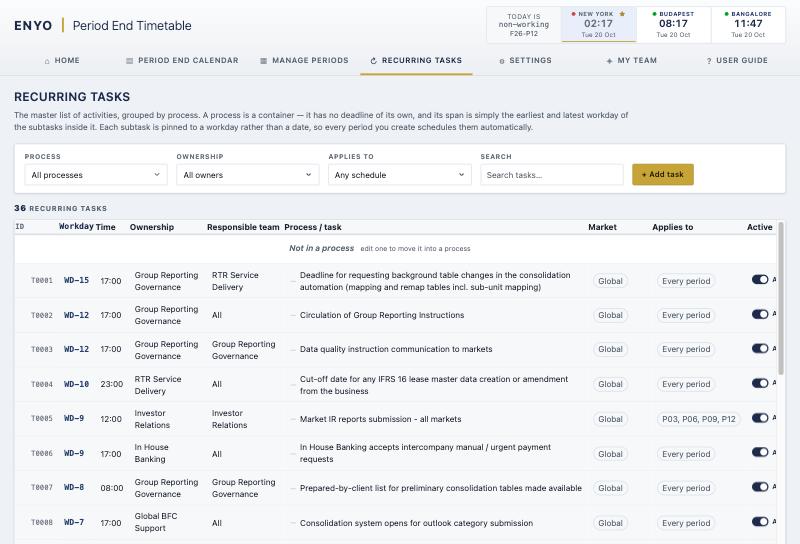
Each period is anchored on its period end date: WD-1 is the last working day on or before it, out to WD-20 and WD+20. Move the end date and everything moves.
One task per market
A recurring task names the markets it covers. Creating a period schedules one task per market, so a task due in eleven countries is eleven sign-offs, not one tick that means nothing.
Who signed off, and when
Completion is recorded against the person and the hour, taken from the signed-in session rather than typed into a form. A reference link points at the workbook the task is about.
Scoped to the markets you own
A colleague can hold one market, a region, or several. They see the whole close and can change only their own part of it. The rest is locked to them, not merely hidden from view.
Why a workday, not a date
A close task is not due on the 3rd. It is due on the third working day, which is a different date in every market and a different date every month.
Set a period end of 30 September 2026 and WD-6 is 23 September, WD+1 is 1 October. Mark a non-working day and the sequence carries on from the next working day, re-pointing every task that sat behind it. That is the whole idea, and it is the part a spreadsheet cannot keep up with.
What it looks like
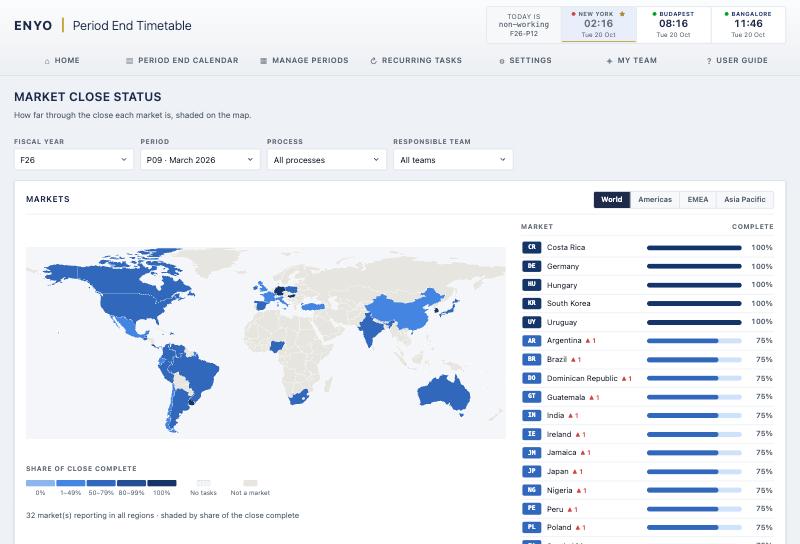
Screenshots from a demonstration close: thirty-three reporting markets, thirty-six recurring activities, one fiscal year.
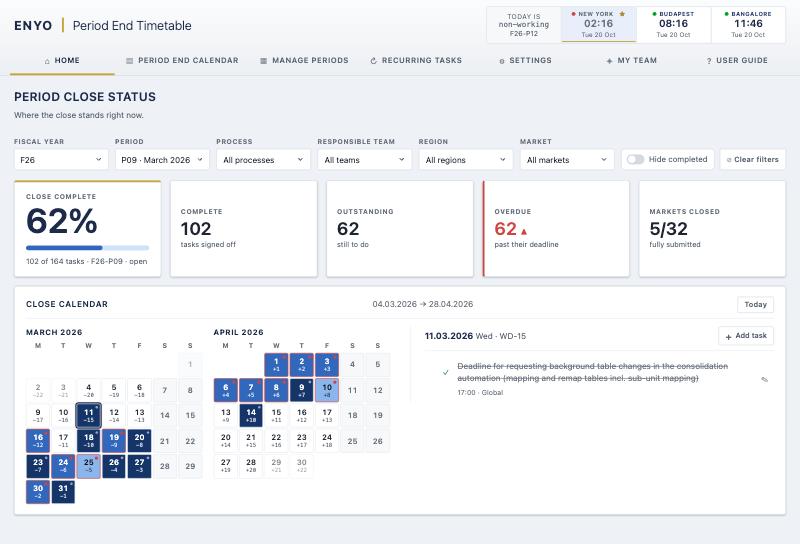
Close status
The whole close in one number
The calendar shades each working day by how much of it is done, and clicking a date lists what is due on it — including what has slipped past its deadline.
Who may change what
The part a controller forwards to IT before they reply to you.
Sees the whole timetable and changes nothing.
Marks a task done in the markets that person owns, and can change nothing else about it — not the date, not the wording, not which market it belongs to. The people who do the work sign their own part of the close without being able to rewrite what they are signing.
Adds, edits and completes tasks — but only in the markets and regions that person was given, and only public tasks plus their own private ones.
Additionally shapes periods, recurring tasks, settings and people, and works in every market regardless of what is assigned.
A link that carries a person's name, their role and the markets they will cover, applied the moment it is used. Anybody may invite a reader; only an administrator may hand out write or administrator. That rule is in the database, not in the page.
How your data is looked after
The short version, in plain words. If your IT team needs the long one, they can ask us for it.
In a data centre in Frankfurt, Germany. It is encrypted where it is stored, and whenever it travels between there and you.
The people your organisation invites, with the role and the markets you give them, and nobody else. An account without an invitation sees nothing of yours.
Email and password, or your Apple or Microsoft account. With Apple or Microsoft your password stays with them, together with any two-step check your company already uses.
Sell your data, show you advertising, or use your close for anything but running your timetable.
Close your account from inside the app whenever you like. Your private work, and any calendar only you are in, are deleted with it. Sign-offs you made keep your name, because the record of the close needs it.
If you think you have found a security problem, write to info@enyotechnologies.com. Reports like that are answered before anything else.
Against a spreadsheet
Teams closing in more than one country usually track it in a shared spreadsheet, or in a general task tracker — Asana, Monday.com, Planner, Jira. The table settles one question: whether a deadline re-points itself when the period end moves. Two of the five rows go against us.
| Period End Timetable | A shared spreadsheet | A general task tracker | |
|---|---|---|---|
| Deadlines derived from the period end, counted in working days | ✓ | ✕ | ✕ |
| One task per market, created automatically | ✓ | ~ | ~ |
| Edit rights scoped to a person's markets, enforced in the database | ✓ | ~ | ~ |
| A full history of every change | ✕ | ~ | ✓ |
| An outside security audit you can read | ✕ | ✓ | ✓ |
Nothing here replaces the ERP close. This is for the coordination around it.
Plans
Priced per editor, per month, with a cheaper seat for a market owner who only signs off. A plan sets how large a close it covers — reporting markets, recurring activities and years — rather than which features you get. Colleagues who only read are never charged for.
Free
One editor, five who read
FreeNo time limit, no card
One controller running their own close, or anyone who wants to find out on their own data whether a derived workday grid helps.
Create a free account- 3 reporting markets, 12 recurring activities, one fiscal year
- Every task pinned to a working day, WD-20 to WD+20, derived from the period end date
- Sign-off recorded against the person and the hour, and not rewritable afterwards
- Reminders, reference links, and installs to the home screen
Team
No limit on people
€9$9€11$11per editor, per monthbilled annually
A finance team sharing one close: the group controller, the regional controllers, and whoever chases the markets outside the group system.
Start on TeamEverything in Free, plus:
- 15 reporting markets, 150 recurring activities, and as many years as you keep
- Four roles: read, sign-off only, read and write, administrator
- A sign-off seat costs €3$3€4$4 — for a market owner who confirms their own work and changes nothing else
- Invitations that carry a name, a role and the markets that person will cover
- A writer changes only the markets they own — refused in the database, not by hiding a button
- Only an administrator sees the whole roster and the outstanding invitations
Enterprise
No limit on anything
€12$12€15$15per editor, per monthbilled annually
A group with one owner per reporting market, in more markets than Team covers.
Start on EnterpriseEverything in Team, plus:
- No ceiling on reporting markets, recurring activities or years
- Write access by region: give somebody EMEA and they keep covering the markets added to it next year
- Your markets, regions and reporting structure set up before your first close
- Your first period built with you, from the close calendar you use today
- Your market scoping reviewed before a live close runs through it
- A named contact who wrote the software, rather than a ticket queue
- A call each quarter, for as long as that is useful to you
Prices exclude VAT. The currency is fixed when a subscription starts, and the euro and dollar figures are set separately rather than converted. Nobody is charged for a colleague who only reads the timetable.
Questions people ask
- Does it replace our ERP close?
- No. It is for the coordination around it — particularly the entities that are not in the group system, where the close is otherwise tracked in a spreadsheet and a recurring meeting.
- How do people sign in?
- Email and password, Sign in with Apple, or Sign in with Microsoft. People join by invitation.
- Does it install on a phone?
- Yes. It adds to the home screen on iOS and Android and to the taskbar or Dock on Windows and macOS, and it opens with no connection, showing the last state it saw. Signing a task off needs the connection back.
- Are holiday calendars per market?
- Not yet. Non-working days are set per period and apply to the whole timetable. Per-market holiday calendars are on the list and are not built.
- How mature is it?
- It is in daily use for a real month-end close and is being developed actively. It is not a large product with a large company behind it, and if you need one of those this is not it.
Have a look
If you close in several countries and you are tracking it in a spreadsheet, this was built for exactly that. Write and say how many markets you close and what you use today.
info@enyotechnologies.com